Less busywork. More business.

Every business expense, across every account — sorted automatically.

Connect your business bank and card accounts. UncleLess categorizes every transaction as it posts, so you always have one clear picture of your business. You only confirm the few it isn't sure about.

Get started free See how it works

CPAs: your clients arrive organized. See how it works for firms →

The UncleLess mascot, giving a thumbs up

Sound familiar?

Business expenses hiding on your personal card.

UncleLess finds them — and keeps the rest private.

Logging into four banks to see one business.

One view of every account, always current.

Spending Sunday afternoons sorting expenses.

Sorted automatically the moment they post.

Handing your CPA a 12-month mystery.

Invite them in: clean, organized records — and nothing personal.

Bonus

And while we're at it…

  • Spreadsheets? Retired.
  • Personal coffee on the business card? One swipe. Stays private.
  • Pile of receipts? Snap it. Done.
  • Bank won't share your history online? Drop in the PDF statement.

How it works — for Business Owners

No manual data entry. No spreadsheets. No shoebox of receipts.

1

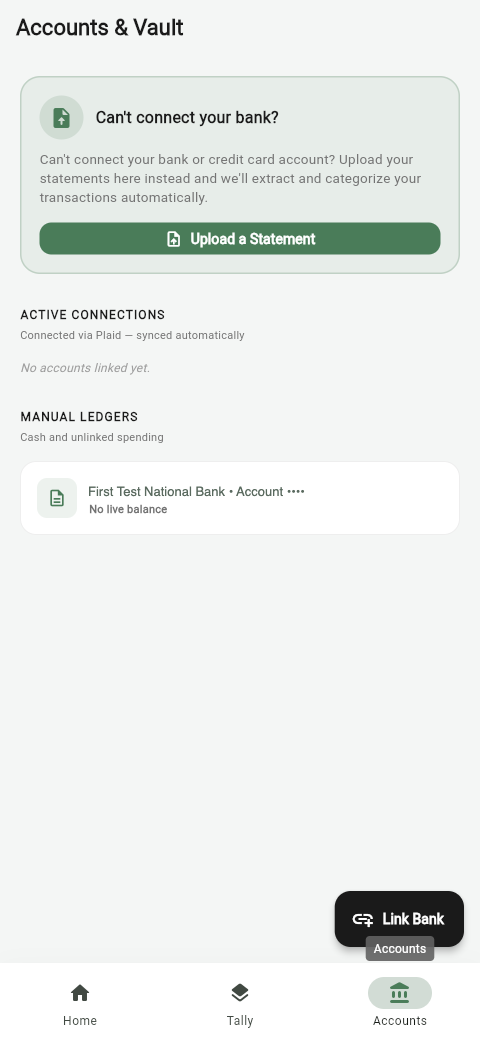
Link your accounts

Connect your business (and personal, if mixed) bank and card accounts. UncleLess pulls your transaction history automatically.

UncleLess Accounts & Vault screen showing linked bank accounts
2

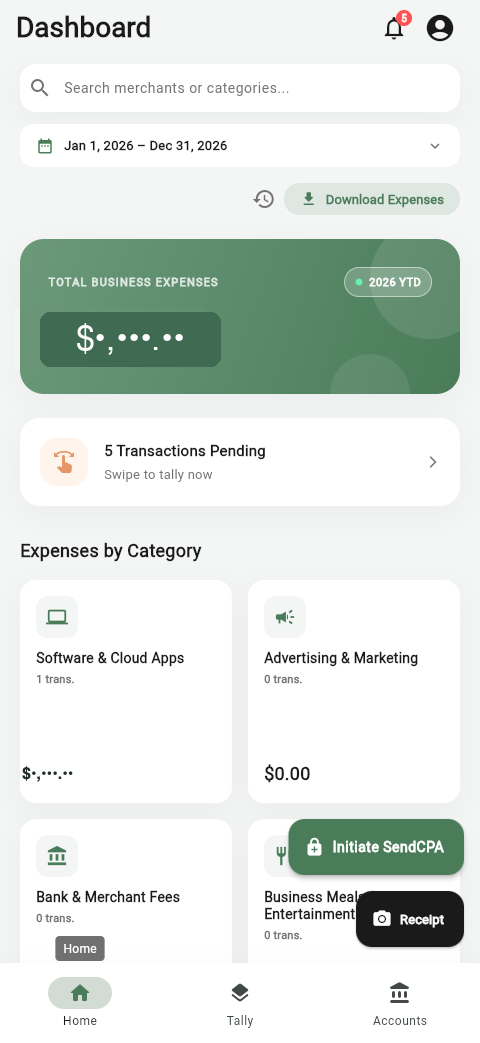
Automatic categorization

Most transactions are categorized the moment they arrive — this is the core of how UncleLess works, not manual data entry.

UncleLess dashboard showing total business expenses and expenses by category
3

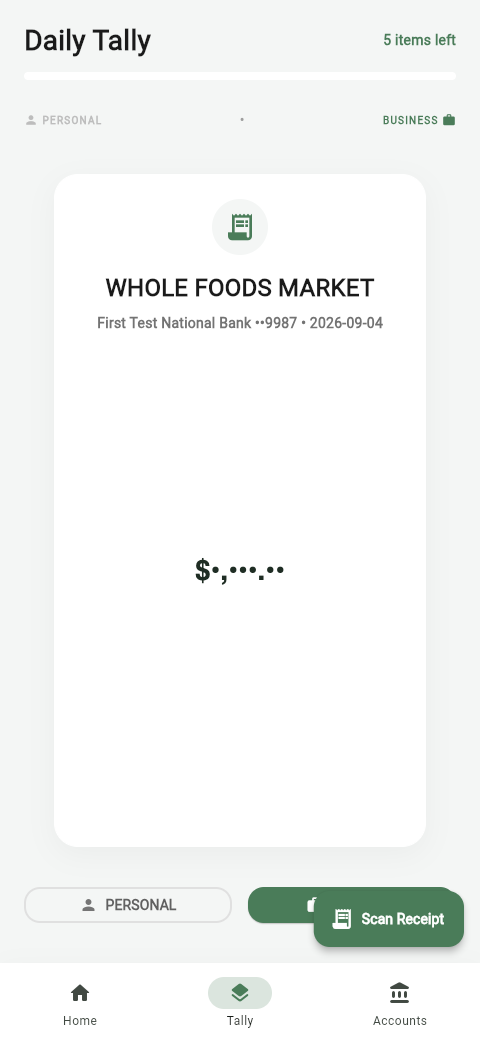
Swipe the rest

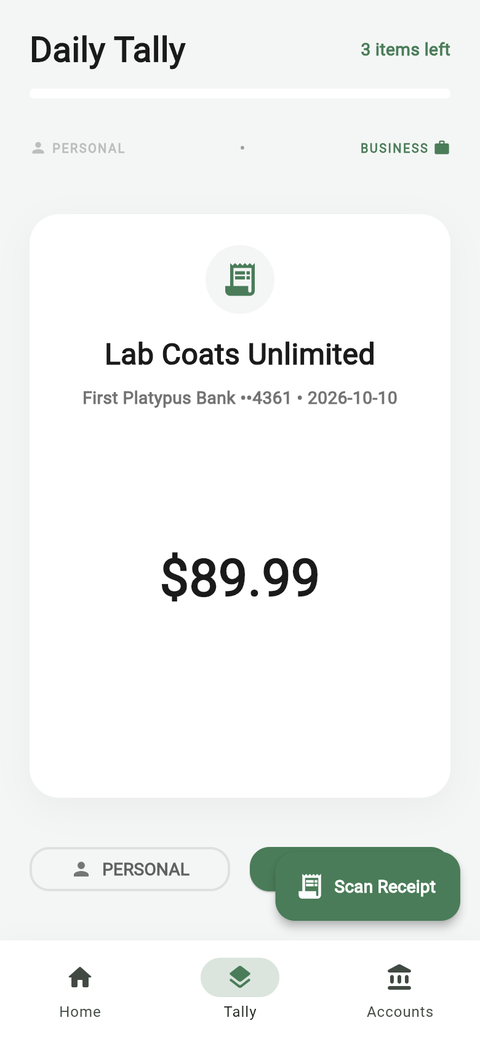
A small number of transactions UncleLess isn't confident about land in your Daily Tally. Swipe each one business or personal in seconds.

UncleLess Daily Tally screen for swiping a transaction as business or personal
4

Your dashboard, always up to date

See your total business expenses, category breakdown, and full transaction history any time — never limited by your plan.

UncleLess dashboard showing year-to-date total business expenses
5

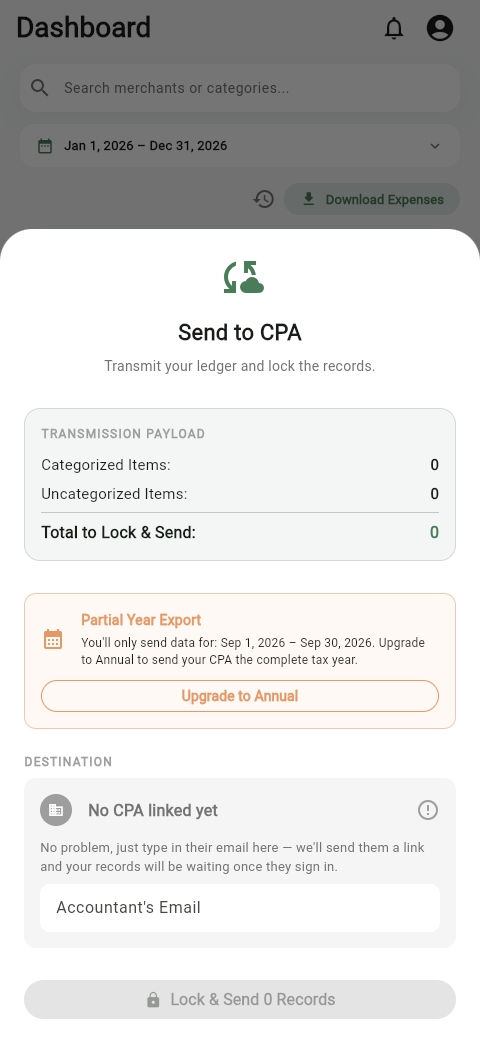
Hand off to your CPA

Invite your CPA into UncleLess directly (free for them), or export a CSV — either way, already organized.

UncleLess Send to CPA screen for transmitting your ledger

How it works — for CPAs

Stop typing. Start reviewing.

Upload a PDF statement, and UncleLess pre-categorizes the merchants it recognizes so you can review and confirm instead of typing from scratch.

A shoebox of statements every March.

Drop in the PDFs. Every line is read, dated, and filed in the right tax year.

Manual data entry.

Lines arrive pre-categorized from your past choices. Review, confirm, and you're done.

Clients' personal spending mixed into the books.

You see only what the client tagged as business. Personal never reaches you.

Rebuilding Schedule C from scratch for every client.

Totals mapped to Schedule C lines with your chart of accounts. You set every percentage.

1

Bring your clients in

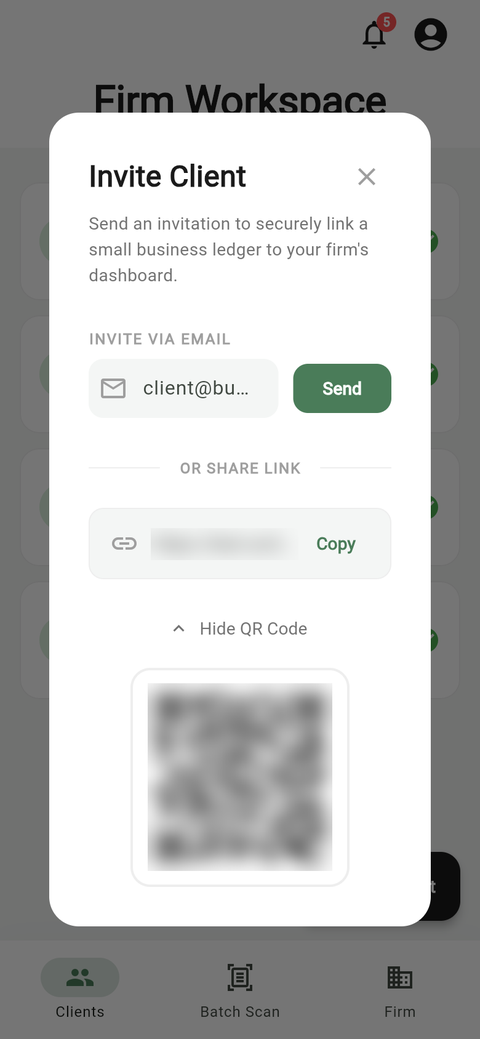
Send an invite link, or show a QR code in your office. Clients can invite you too, and accepting is always free.

UncleLess Invite Client screen with an invite link and a QR code
2

One roster, every client

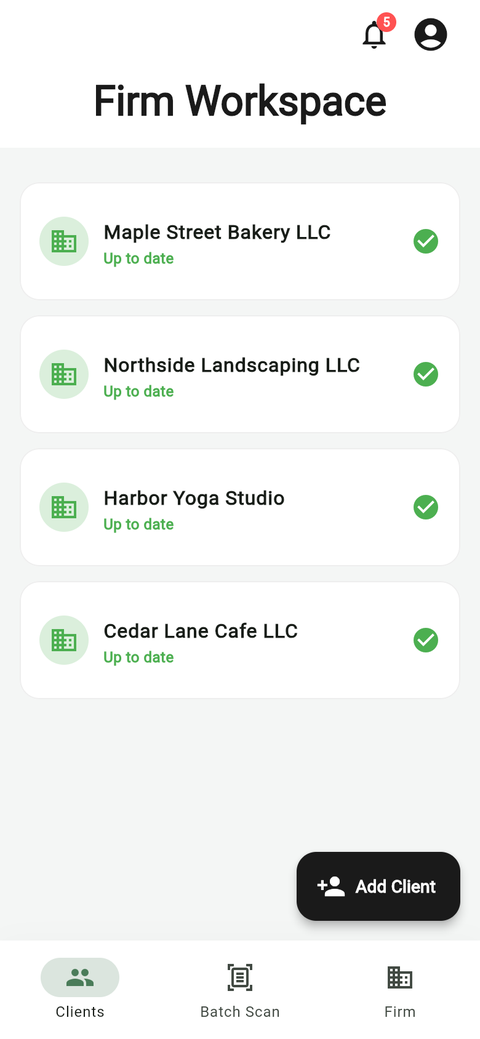
Every client in one place — app-connected and paper. When a client sends new records, you see what's new or changed since their last send.

UncleLess Firm Workspace listing a CPA's clients, each marked up to date
3

The client ledger

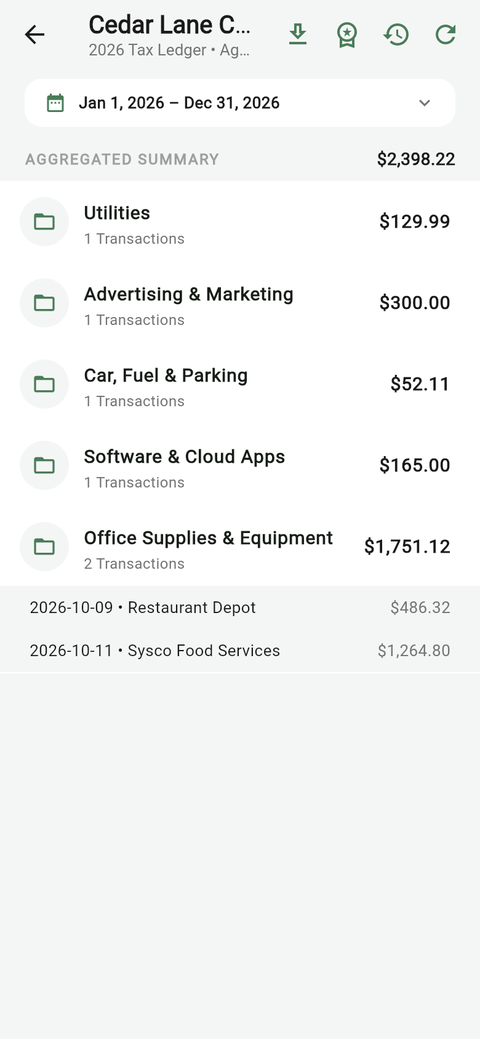
Categorized lines, running totals, and receipts just one click away. Business transactions only.

A client's ledger in UncleLess, grouped by category with totals
4

A real privacy boundary

You only see transactions your client tagged as business. Personal ones are never reachable, not just hidden.

A client's Daily Tally in UncleLess, where they mark each transaction personal or business
5

Export any time

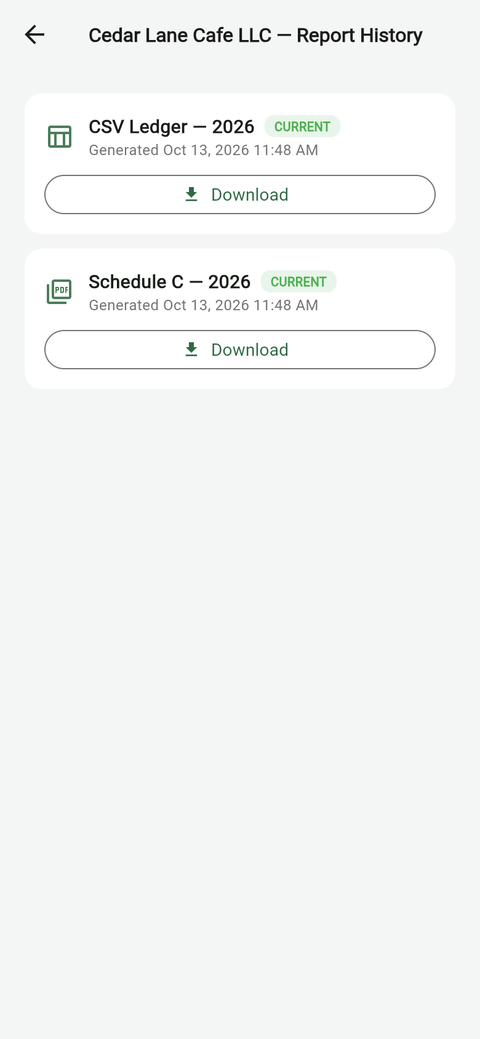
Download any client's ledger as a CSV, free, or move straight to the Schedule C Workbook below.

A client's Report History in UncleLess with a CSV ledger and a Schedule C ready to download

Viewing app-connected clients and CSV export are always free. Statement scanning and the Schedule C Workbook come with a CPA plan.

CPA plan

PDFs in, categorized ledgers out

For clients who'll never link a bank: upload their PDF bank and card statements.

  • UncleLess reads the statement and pre-categorizes recognized merchants based on your past choices for that client, your firm-wide defaults, or our built-in list.
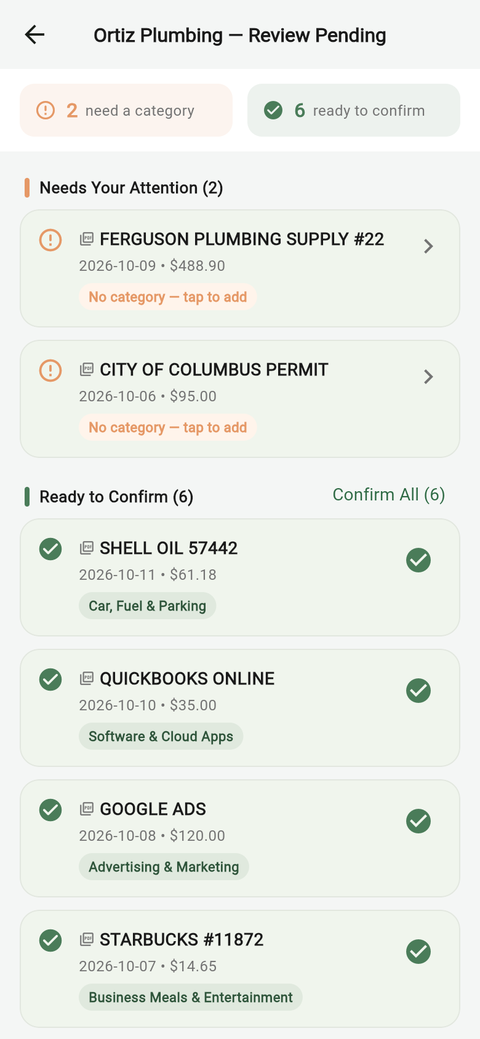
  • You review and confirm the pre-categorized lines in one click. Unrecognized merchants and deposits arrive blank for you to pick once.
  • Your choices build your defaults. Categorize a new merchant once, and it is remembered for that client and becomes your default across your entire firm.
  • Every statement is filed in the correct tax year, even when the dates cross from December into January.
UncleLess statement review queue: six lines ready to confirm with categories filled in, two needing a category
CPA plan

The Schedule C Workbook

Available from any client's ledger, app-connected or paper, for the current or prior tax year.

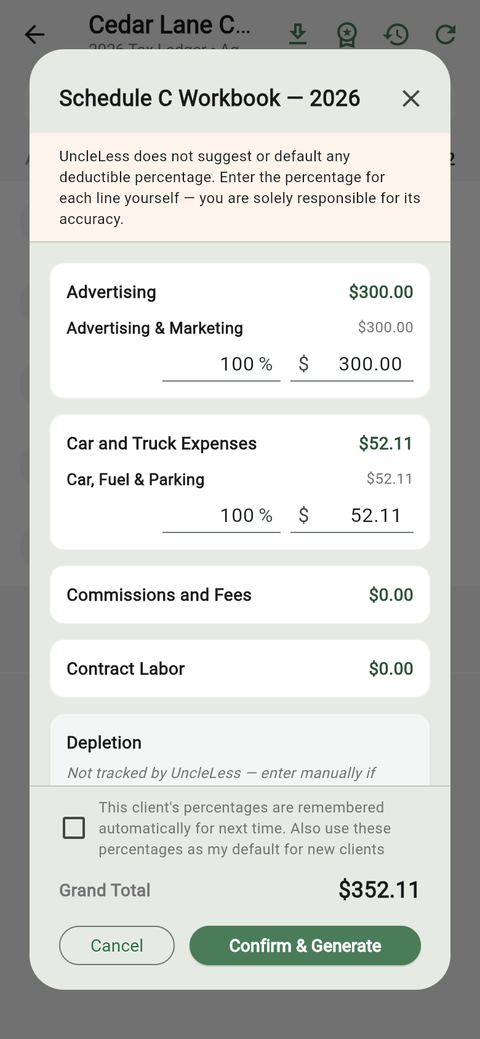
  • Totals are mapped to Schedule C lines using your own chart of accounts.
  • You enter the deductible percentage for each line. UncleLess never suggests one.
  • Your values are remembered for that client, ready for next year.
  • Download an Excel workbook and a PDF for your review and your files.
UncleLess Schedule C Workbook with the CPA's own percentages entered

UncleLess organizes your clients' records. You prepare and file, and nothing in UncleLess is tax advice.

Simple, transparent pricing

Business Owners get a free trial through the end of their signup month. CPAs never pay to accept a client invite or view/download a client's records — a subscription is only needed for the Schedule C Workbook and batch statement-scanning.

Monthly Annual

For Business Owners

Basic
$9.99/mo $99/yr
first 12 months, then $14.99/mo first year, then $149/yr
  • Up to 5 linked institutions
  • Automatic categorization on every transaction
  • Daily Tally for the handful it's not sure about
  • Full dashboard & transaction history
  • Invite your CPA for free
Start with Basic

For CPAs & Tax Professionals

Accepting a client invite, viewing their ledger, and downloading a CSV are always free. A subscription unlocks the Schedule C Workbook and batch statement-scanning.

Basic
$99.99/mo $999/yr
first 12 months, then $149.99/mo first year, then $1,499/yr
  • Unlimited app-connected clients
  • Up to 10 statement-upload clients
  • 25 statement scans / month300 statement scans / year, all up front
  • Schedule C Workbook
  • Batch statement scanning
Start with Basic

Need more scans? Statement bundles (one-time top-ups, with a CPA plan)

20scans$35
50scans$80
100scans$150

All prices plus applicable sales tax.

Pricing questions

The essentials — reach out any time for anything else.

Is there a free trial?

Yes. Business Owners get a free trial through the end of their signup month — your first bill is the 1st of the following month, no matter which day you signed up. CPAs never pay to accept a client invite or view/download a client's records in the first place.

Can I switch tiers?

Yes — upgrade or downgrade between Basic and Pro at any time from your account settings. Switching keeps your intro pricing: the months you've already paid count toward the same 12.

How does the intro price work?

On a monthly plan, your first 12 monthly payments are at the intro price; after that, the standard price shown on the card applies. On an annual plan, a year bought within your first 12 months is at the intro price; after that, the standard annual price applies.

What happens if I hit my institution or statement-scan limit?

Business Owners on Basic can upgrade to Pro for unlimited linked institutions. CPAs who use up their statement scans can buy a one-time statement bundle top-up, wait for the allowance to reset (the 1st of each month on a monthly plan; annual plans get the whole year's scans up front), or upgrade to Pro for a higher allowance.

Do CPAs pay to view or download a client's records?

No. Accepting a client invite, viewing their categorized ledger, and downloading a CSV are always free. A CPA subscription is only required for the Schedule C Workbook and batch statement-scanning.

What are statement bundles?

One-time top-ups for CPAs who need extra scans beyond their plan's allowance — available in 20-, 50- and 100-scan packs. Bundle scans never expire, and bundles are available with an active CPA plan.

What counts toward the 10-client limit on CPA Basic?

Only statement-upload clients (the ones whose statements you scan). App-connected clients are unlimited on every plan. If you reach the limit, archive a client you no longer work with to free the spot, or move to Pro for unlimited statement-upload clients.

Is sales tax added?

Ohio sales tax is added at checkout where it applies.

Get UncleLess

Use it right in your browser today — no install required.